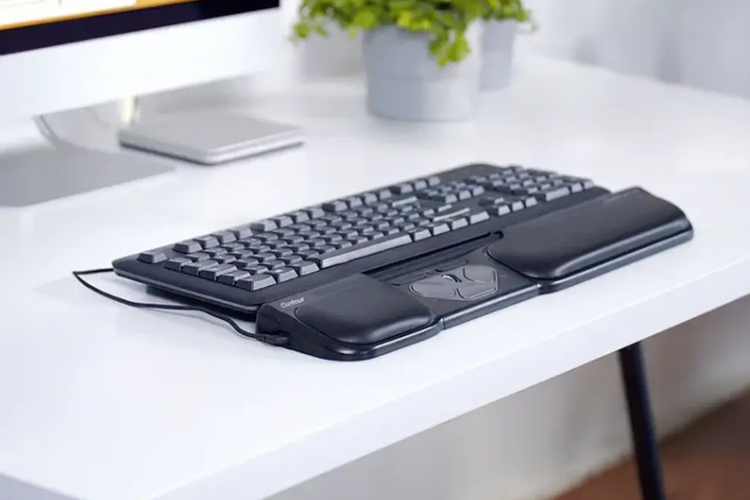
Contour develops ergonomic mice and keyboards that contribute to a comfortable and ergonomic workspace. The brand is best known for its RollerMouse, a centered mouse that you operate directly in front of your keyboard, and the adjustable Unimouse. With these products, Contour offers different ways to adapt your workspace to your personal preferences and daily tasks.
Whether you frequently work with spreadsheets, write texts every day or regularly switch between typing and using a mouse, the right equipment helps you work comfortably. Explore the range of Contour ergonomic mice and keyboards at Ergo2Work and choose the products that best suit your workspace.
Free shippingFree delivery on orders over 150 euros
Shipped TodayOrdered before 15:00, shipped today
Personal AdviceAvailable via phone at +31 24 3244084
28 Days Trial OrderTry the product at your own pace for 28 days
About Contour
Contour, also known as Contour Design, specialises in ergonomic mice and keyboards for computer workstations. The brand focuses on the natural positioning of your hands and arms while working and develops products that suit different working postures and user preferences.
Contour is characterised by its various ergonomic designs. The RollerMouse is operated centrally in front of your body, while the Unimouse is an adjustable vertical mouse. With its Balance keyboards, the brand also offers keyboards designed for use in combination with centered mice.
By choosing a mouse and keyboard that work well together, you can create a workspace where your hands and arms are comfortably positioned. The different models and adjustment options make it easier to choose equipment that suits your way of working.
The Contour product range
Contour offers a variety of ergonomic mice and keyboards that allow you to adapt your workspace to your personal preferences. The range includes centered mice, vertical mice and ergonomic keyboards.
Contour centered mice
A centered mouse is placed directly in front of your keyboard, centrally aligned with your body. This means you do not have to constantly move your arm sideways to control the cursor. Your hands remain closer to your body, which can support a relaxed and symmetrical working posture.
By reducing the distance you need to reach for your mouse, your shoulders and arms can remain in a more natural position. This can help limit unnecessary muscle tension in the shoulders and neck. A centered mouse can contribute to a more comfortable working posture, especially when you work at a computer for extended periods or regularly switch between typing and using a mouse.
Another advantage is that many centered mice can be operated with either your left or right hand. This allows you to alternate between both hands and distribute the physical strain more evenly.
The Contour RollerMouse series uses a rollerbar to control the cursor. You operate the mouse directly in front of your keyboard without having to repeatedly move your arm to the side.
Take a look at the Contour RollerMouse Pro3, a wired centered mouse that is placed directly in front of your keyboard.
Contour vertical mice
A vertical mouse has a different shape from a traditional computer mouse. Its vertical design allows you to hold your hand in a more natural, handshake-like position. As a result, your forearm does not have to rotate inwards as much as when using a standard flat mouse.
A vertical mouse can contribute to a more comfortable position of your hand, wrist and forearm. This grip can be particularly comfortable if you use a mouse extensively throughout the day. You continue to use the mouse alongside your keyboard in the familiar way, but with a different hand position.
The Contour Unimouse stands out thanks to its adjustable tilt angle. This allows you to adjust your hand position to suit your personal preferences. The Unimouse is available in several versions, including wired and wireless models, as well as options for left-handed and right-handed users.
In addition to ergonomic mice, Contour develops keyboards that contribute to a comfortable working posture.
The Contour Balance Keyboard is designed for use in combination with centered mice, such as the RollerMouse. As the keyboard and mouse are designed to complement each other, you can position both devices close together. This reduces the distance you need to reach and allows your arms and shoulders to remain in a more relaxed position.
The keyboard features a low-profile design and an adjustable tilt angle, allowing you to adjust the position of your hands and wrists. This supports a comfortable typing posture, especially when you spend several hours a day working at a computer.
Contour develops ergonomic input devices with a focus on ease of use, adjustment options and the positioning of your hands and arms. The product range offers various ways to adapt your workspace to your individual working style.
Different ergonomic designs
With a centered RollerMouse or a vertical Unimouse, you can choose between different ways of operating your mouse. This allows you to determine which design best suits your daily tasks and personal preferences.
A comfortable position for your hands, arms and shoulders
Centered mice reduce the distance you need to reach for your mouse and can help keep your shoulders and neck more relaxed. Vertical mice support a less rotated forearm position. Both designs offer an ergonomic alternative to the traditional computer mouse.
Adjustment options and different versions
The adjustable Contour Unimouse allows you to customise the tilt angle. Depending on the model, Contour also offers wired and wireless versions, as well as options for left-handed and right-handed users.
Mice and keyboards designed to work together
Contour Balance keyboards have been developed for use alongside RollerMouse models. This allows you to position your input devices close together and create a well-organised workspace.
Buy Contour at Ergo2Work
Looking to buy a Contour mouse or keyboard? At Ergo2Work, you will find a range of ergonomic input devices that allow you to adapt your workspace to your personal preferences and daily tasks.
Choose a Contour RollerMouse if you want to operate your mouse centrally in front of your keyboard and reduce sideways reaching movements. Do you prefer using a mouse alongside your keyboard but want a different hand position? Then the adjustable Contour Unimouse is worth considering. You can further complement your workspace with a Contour Balance Keyboard.
Compare the different models, paying attention to the operating method, adjustment options, connection type and suitability for left-handed or right-handed use.
Explore the range of Contour mice and keyboards at Ergo2Work and discover which product best suits your workspace.
Frequently asked questions about Contour
What makes Contour ergonomic mice unique?
Contour develops ergonomic mice that support a natural and relaxed working posture. With centered mice and adjustable vertical mice, Contour offers different solutions to reduce strain on the hands, wrists, arms and shoulders.
What is a Contour RollerMouse and how does it work?
The Contour RollerMouse is a centered ergonomic mouse that you place directly in front of your keyboard. You control the cursor by rolling and moving the rollerbar sideways. This reduces the distance you need to reach for your mouse and allows you to keep your arms closer to your body.
What is the difference between the Contour RollerMouse and Unimouse?
The RollerMouse is a centered mouse that can be operated with both hands. The Unimouse is an adjustable vertical mouse with a tilt angle of 35 to 70 degrees and an adjustable thumb rest. Both models support an ergonomic working posture but differ in how they are operated.
Can a Contour mouse help with RSI symptoms?
Contour ergonomic mice are designed to reduce physical strain during computer work. By supporting a more natural working posture, they can help reduce strain on the wrists, arms, neck and shoulders. An ergonomic workstation setup and regular changes in posture remain important.
What is the difference between the Contour RollerMouse and SliderMouse?
Both mice are positioned centrally in front of the keyboard. The RollerMouse uses a rotating rollerbar, while the SliderMouse uses a sliding mechanism. Which mouse is best suited to you depends on your personal preferences and way of working.